Most creative software comes as a fixed package. You memorize its buttons, menus and limitations. Now, you can simply describe the tool you need instead. Google offers precisely that possibility. Its new Google Flow Tools feature turns plain written requests into small working apps. On September 23, 2026, Google Labs released six such tools built with professional creators. Arathi Sethumadhavan and Olivia Sturman announced them on the Google blog. Sethumadhavan directs user experience research at Google, while Sturman manages products at Google Labs.
Together, they partnered with experts from architecture, sound design and digital content. “We understand that everyone’s needs and workflows are different,” the authors wrote. A workflow simply means the ordered steps someone follows to finish a job. In other words, one app rarely fits every artist. For this reason, Google lets people build custom workflows by describing them. In this article, you will meet each tool in turn (Sethumadhavan & Sturman, 2026).
How Google FLow Tools Work
First, it helps to see how Flow Tools work. Google Flow started as an AI filmmaking app at Google’s 2025 I/O conference. At I/O 2026, Google added Tools, which let users “vibe code” creative apps. Vibe coding means describing software in everyday language while AI writes the code. To build one, you open Flow and type a request called a prompt. Then, Flow writes the code and builds the tool’s interface for you (Google, n.d.).
An interface is the set of buttons, sliders and boxes you actually touch. Behind the scenes, a large language model handles the translation. Such a model identifies patterns in enormous collections of text, including computer code. Google says users need no coding experience at all. In addition, users can share tools so others can remix them. However, only Google AI subscribers can create or remix tools (Google, 2026). Our explainer on how AI video generators work adds useful background.
Mondo Sónico: Google Flow Tools for Layered Sound Design
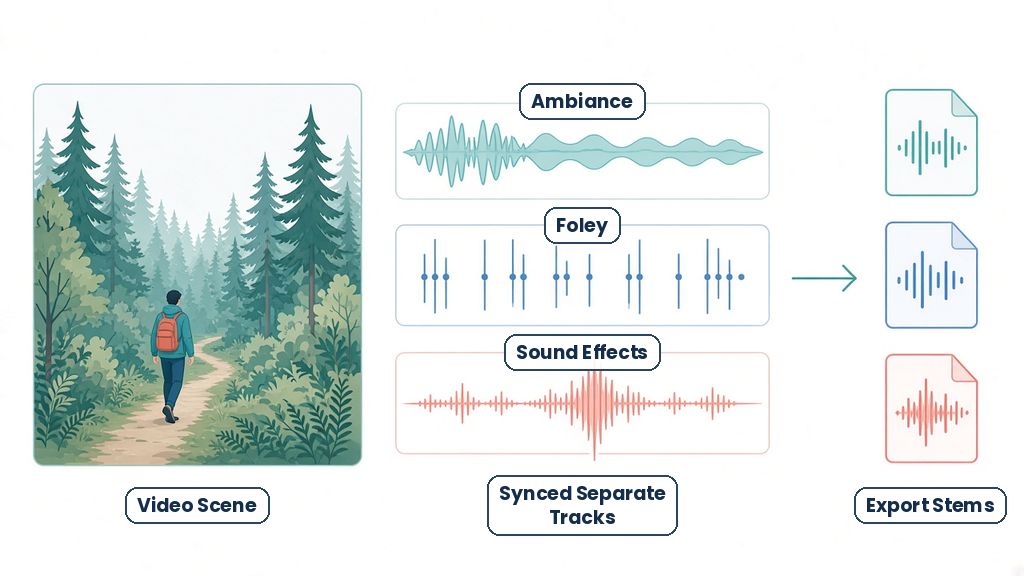
To begin with, Mondo Sónico focuses on sound for video. Creative director Ricardo Villavicencio and sound designer Sebastián Carvallo built it together. The tool generates custom background ambiance, foley and contextual sound effects. Ambiance is the steady background sound of a place, such as wind or traffic. Foley means everyday sounds, like footsteps, recreated to match on-screen action. Contextual effects are sounds that fit what happens in a particular scene.
Moreover, Mondo Sónico synchronizes these sounds with the picture. In plain terms, each sound lands at the right moment. It also keeps every layer on a separate, editable track. As a result, editors can export each track, called a stem, on its own. Stems let professionals adjust volume and effects during post-production. Post-production is the editing stage after filming ends. For STEM readers, this tool connects to acoustics, the physics of sound. After all, sound engineers rely on that science every day.
Fig. 1: How Mondo Sónico Layers Sound
CaptionCast: Fast Captions in Several Languages
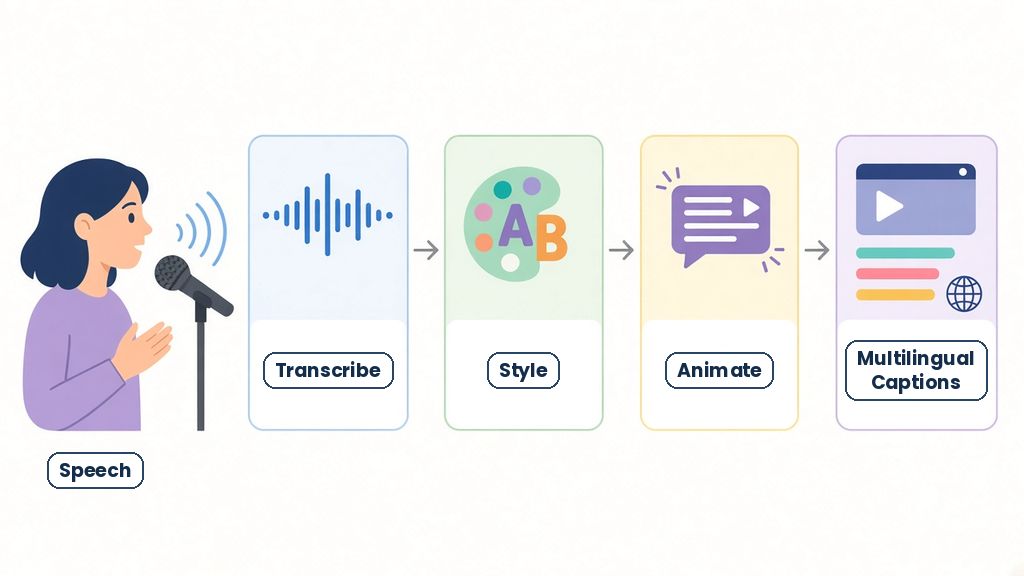
Next comes CaptionCast, built by digital storyteller Jay Pirabakaran. Captions are the words that appear on screen as people speak. Traditionally, editors typed these subtitles line by line, which takes hours. By contrast, CaptionCast handles the whole job in a single pass. A pipeline is a chain of steps where each output feeds the next. In this case, the pipeline transcribes, styles and animates the captions. Transcribing means turning spoken words into written text. Styling then sets the font, color and size of those words. Finally, animation makes the captions move with the speech.
CaptionCast also works across several languages, so it produces multilingual captions. According to Google, the whole process takes only seconds. For that reason, creators can reach viewers who speak other languages. Captions also help people who are deaf or hard of hearing. Behind the scenes, this work draws on speech recognition, a major field of machine learning.
ThumbnailForge: Google Flow Tools for Social Cover Art
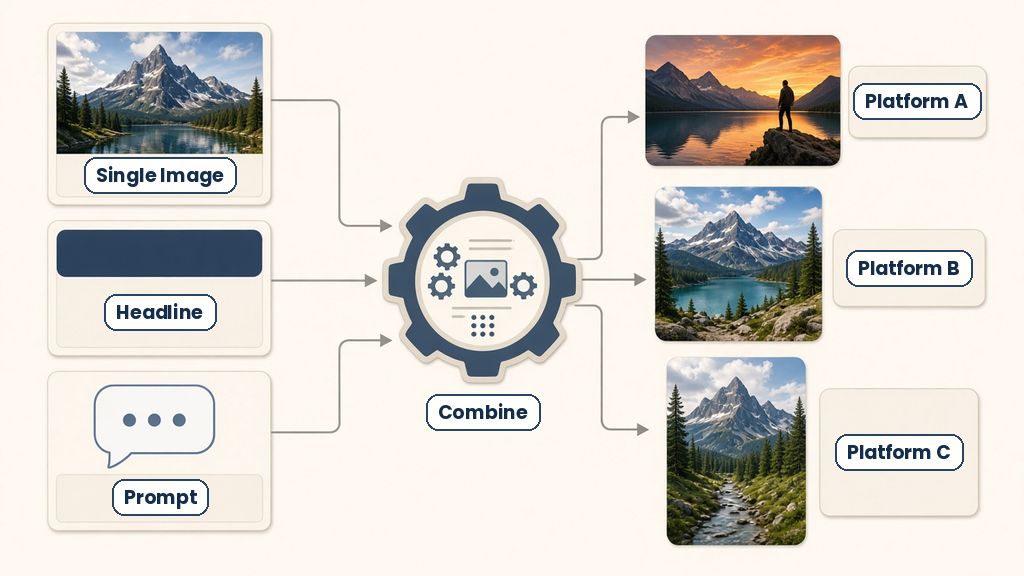
Pirabakaran also built ThumbnailForge for social media cover images. A thumbnail is the small preview picture people see before clicking a video. Creators often spend time formatting the same cover art for several platforms. Each platform may need its own shape and layout. ThumbnailForge replaces that manual formatting and rendering work. Rendering means the computer drawing the final image from its parts. To use it, a creator supplies three simple inputs. First, they add a single image. Second, they add a headline, the short title text. Third, they write a prompt that describes the desired look. Then, the tool combines these inputs into photorealistic thumbnails. Photorealistic means the result looks like a real photograph. In short, one set of inputs becomes cover art for several platforms. That approach saves time while keeping a consistent visual style. Designers call that consistency a visual identity.
Fig. 3: ThumbnailForge Turns Three Inputs Into Thumbnails
Surface: Real-Time Textures for 3D Rooms
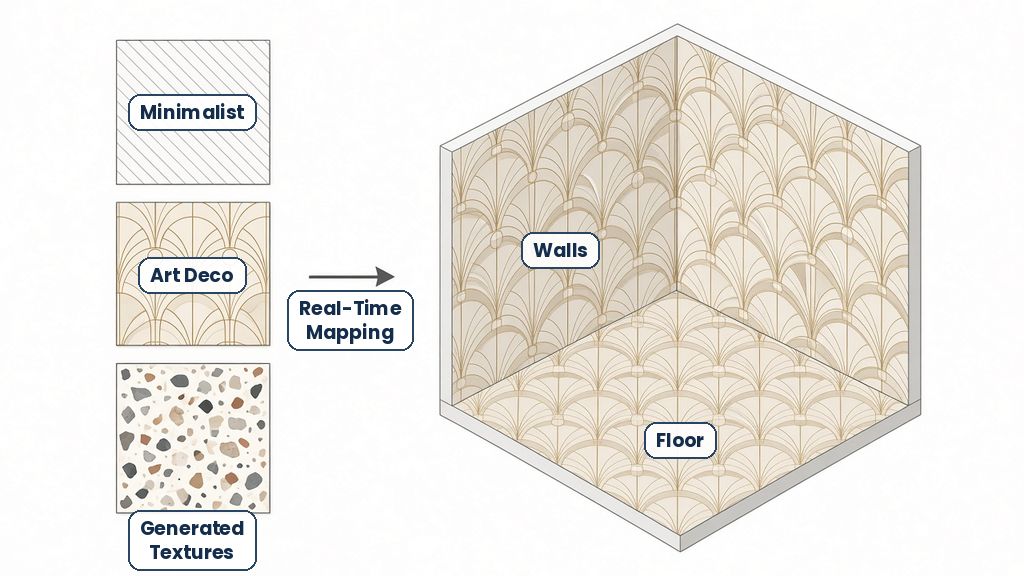
The fourth tool, Surface, comes from interior designer and technologist Vojtek Morsztyn. Architects often spend hours finding, testing and drawing building materials. Instead, Surface generates custom textures for early design work. A texture is the surface pattern that gives a wall or floor its look. The patterns range from minimalist designs to Art Deco tiling. Art Deco is a bold, geometric style that became popular in the 1920s. Then, the tool maps these textures onto 3D walls, ceilings and floors. Mapping means wrapping a flat image around a 3D shape, much like wrapping paper. Notably, this happens in real time, so designers see changes instantly. Google calls this use material ideation. In other words, designers can explore many material ideas quickly. The tool relies on 3D geometry, the same math behind video games. Our guide on the rise of no-code tools shows how such design apps evolved.
Fig. 4: Surface Maps Textures Onto 3D Rooms
CollageMotion Pro: Animated Collages From Text Prompts
Filmmaker and science communicator Hashem Al-Ghaili built the last two tools. The first, CollageMotion Pro, serves documentary storytelling. A collage mixes photos, drawings and shapes into one picture. In mixed-media work, artists combine many materials in a single scene. Making such collages by hand is slow and labor-intensive. Each piece must be cut, arranged and then animated frame by frame. By comparison, CollageMotion Pro starts from simple text prompts. From those prompts, it generates dynamic, animated mixed-media collages. In addition, it works at scale, which means it can produce many collages quickly. As a result, a documentary maker could illustrate ideas that lack real footage. For example, science stories often explain events no camera has recorded. Animated collages can fill those gaps with clear, eye-catching visuals. That makes the tool useful for science communication, Al-Ghaili’s own field. Students could likewise use similar tools for science fair presentations.
Fig. 5: CollageMotion Pro Builds Animated Collages
SwissFlow Studio: Swiss-Style Motion Graphics From Scripts
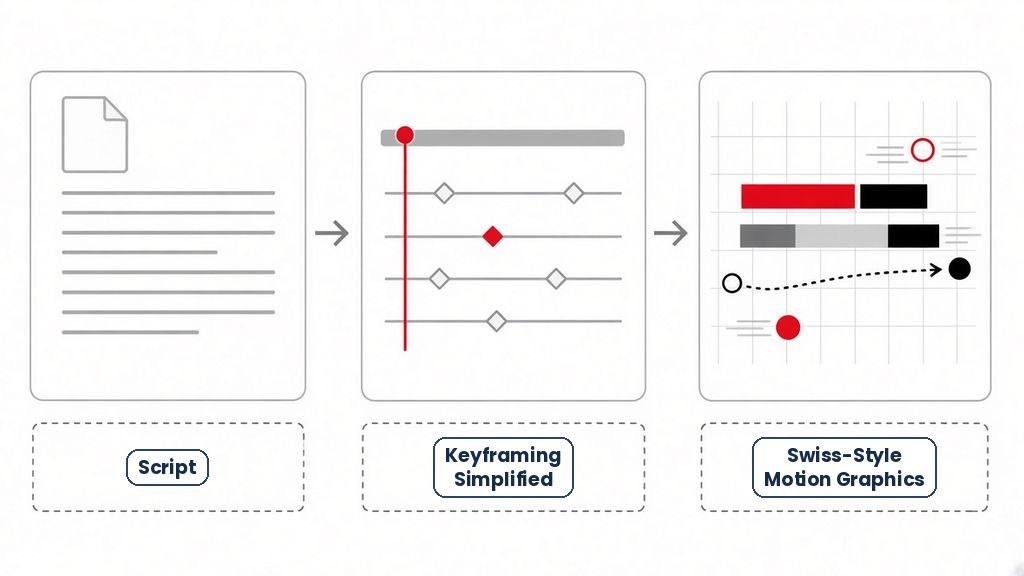
Al-Ghaili also built SwissFlow Studio for motion graphics. Motion graphics are moving text, shapes and charts used in videos. SwissFlow Studio converts written scripts directly into these animations. It uses Swiss style, a design approach built on clean grids and simple lettering. In traditional animation, artists rely on a method called keyframing. Keyframing means marking where an animation starts and ends. Afterward, software fills in the frames between those key moments. Even so, setting every keyframe by hand takes careful, repetitive work. For this reason, SwissFlow Studio simplifies that process. Writers can therefore move from script to finished graphics faster. In fact, the tool links writing, design and animation in one place. Together, the six tools show a shared pattern. Each creator started with a tedious task they understood personally. Then, each person described a tool that automates that specific task.
Fig. 6: SwissFlow Studio Turns Scripts Into Graphics
Conclusion: Building Your Own Creative Technology
Google framed the release as a shift in who shapes software. Artists “can now shape their own creative technology,” the authors wrote. In fact, anyone can duplicate and remix these six tools. Users can also build their own tools from scratch. Even so, some limits apply, according to Google’s help page. Tools currently run on the web and on PCs only. Also, media made by a tool uses Flow credits, and Flow shows a warning first. Finally, there is a daily limit on how many tools each person can create. Consequently, students should plan their experiments carefully. Mondo Sónico layers sound, while CaptionCast and ThumbnailForge speed up video publishing. Meanwhile, Surface tests room materials, and Al-Ghaili’s two tools animate stories. Overall, the release shows how creative software is changing. Rather than waiting for companies, creators described the exact tools they needed (Google, n.d.).
Google Flow Tools and Research on AI Creativity
Scientists want to know whether AI tools make people more creative. Researchers have started testing that question with careful experiments. In one study, 293 writers wrote short eight-sentence stories online. Some writers could see story ideas generated by an AI language model. After that, 600 separate readers rated the stories. As a result, AI-assisted stories scored as more creative, better written and more enjoyable. The boost was strongest among less creative writers. On the other hand, AI-assisted stories appeared more similar (Doshi & Hauser, 2024). In other words, individuals improved, but the group’s overall variety shrank. Another study examined over 4 million artworks from more than 50,000 users. There, text-to-image AI raised artists’ productivity by 25% over time. At the same time, the average novelty of the artworks declined. Nevertheless, artists who explored more unusual ideas earned better reactions from peers (Zhou & Lee, 2024).
STEM Careers and Google Flow Tools
These tools sit where art, engineering and computer science meet. For instance, Mondo Sónico draws on acoustics, while Surface relies on 3D geometry. Captions depend on speech recognition, a major field of machine learning. Because of this overlap, many STEM careers connect to creative technology. Software engineers build the AI models and interfaces behind Flow. User experience researchers, like Sethumadhavan, study how people actually use tools.
Meanwhile, sound engineers, architects and animators test those tools in real projects. Our guide to AI careers beyond coding explores more of these paths. Above all, describing a tool clearly is a skill in itself. In particular, you must break a messy goal into small, testable steps. That discipline is fundamental to engineering design. So, students can practice it through school projects, coding clubs and science fairs. For that reason, human curiosity and original ideas still matter a great deal. Over time, those habits will help you build tools of your own.
References
Doshi, A. R., & Hauser, O. P. (2024). Generative AI enhances individual creativity but reduces the collective diversity of novel content. Science Advances, 10(28), Article eadn5290. https://doi.org/10.1126/sciadv.adn5290
Zhou, E., & Lee, D. (2024). Generative artificial intelligence, human creativity, and art. PNAS Nexus, 3(3), Article pgae052. https://doi.org/10.1093/pnasnexus/pgae052
Hrutanshu Kurankar is a Computer Engineering graduate from Marathwada Mitra Mandal’s College of Engineering, Pune. His interests span artificial intelligence, machine learning, cybersecurity, data science, and science communication. He enjoys exploring how emerging technologies work and translating complex technical concepts into clear, accessible explanations for students and young audiences.
His practical experience includes developing FlashCTI, a Retrieval-Augmented Generation (RAG) system for cyber threat intelligence and log analysis, exploring privacy-focused browser extensions, and building machine learning applications. His technical background includes Python, data analysis, machine learning frameworks, web development, vector databases, and cybersecurity tools. Through these projects, he has developed an interest in applying technology to real-world problems and making technical knowledge easier to understand.
Hrutanshu is associated with ENTECH STEM Magazine, where he contributes to science communication and editorial initiatives, including research outreach and activities supporting the Machine Learning Special Issue 2026. His work involves connecting with potential contributors and academic reviewers to encourage participation in STEM research and knowledge sharing. As a science communicator, he aims to bridge the gap between complex scientific ideas and everyday understanding through relatable examples, clear writing, and evidence-based explanations. He is particularly interested in making science and technology engaging and accessible to the next generation of learners.