Explore Browser-Based Stable Diffusion with WebGPU acceleration for accessible AI image generation directly on your machine.
Browser-Based Stable Diffusion Project with WebGPU Acceleration
Estimated reading time: 6 minutes
I love to build tools that make technology accessible. At this time, artificial intelligence feels very central. However, most people access AI through big company servers. I wanted to change that narrative. That’s when I started a project to bring generative AI directly to your window. My tool “ToI – Text to Image Generator” is a browser-based Stable Diffusion with WebGPU hardware acceleration system. It runs entirely on your machine. You do not need to install complex software. You do not need to pay for another AI subscription.
In this article, we will explore this project and see how you can host/run your own AI image model, fully local on your own machine. I will show you how to use this tool.
Why I Chose Browser-Based Stable Diffusion with WebGPU Hardware Acceleration
Prior to this project, I noticed a common problem. Many users find AI installation very difficult. You often need to learn about Python. You must know how to manage environments and dependencies. This prevents many creative people from even trying. At the same time, privacy is a major concern. Many users do not want to upload their data to a cloud. So I chose to build this “ToI – Text to Image Generator” for these exact reasons.
I used WebGPU because it is the future of the web. It allows a browser to talk directly to your graphics card. This provides high performance. To illustrate, it works much faster than older web standards. I wanted to prove that the web can handle heavy tasks. WebGPU makes it possible to run Stable Diffusion locally. As a result, you get a powerful tool in a simple tab. This is a hobby project for me. To be sure, I put a lot of heart into it.
ToI – Text to Image Generator: How This Works for You
To explain the process, I used the ONNX runtime. This handles the heavy math for the images. I also integrated MLC-LLM for a chat feature. You can talk to an AI while you wait for your art. This makes the experience more interactive. At any rate, the user interface remains very simple. You type a prompt and see the magic happen.
The Power of Local Generation
Generating images on your own hardware feels great. All things considered, it gives you total control. You do not have to wait in a queue. You do not have to worry about credits. Provided that you have a GPU, you can create all day. As a matter of fact, the image never leaves your computer. This protects your privacy. In short, your machine is the only one doing the work.
Advanced Features for Better Art
I added several features to help you get the best results. To enumerate, I included Tiled VAE decoding. This feature helps people with less VRAM. It breaks the image into small parts to save memory. I also added Attention control. This lets you change the weight of your words. If you want more “sunset,” you can emphasize it easily. By comparison, many online tools (even paid ones) do not offer this level of control.
Try out ToI - Text to Image Generator here: https://ttoi.netlify.app/
Setting Up Your Browser-Based Stable Diffusion with WebGPU Hardware Acceleration
Using this tool is very easy. At first, you might feel confused. I am here to help you through the steps. You only need a modern browser and a decent GPU.
Hardware and Software Requirements
To list the requirements, you need Chrome 113 or higher. You can also use Edge Canary. These browsers support WebGPU best. You also need a dedicated GPU. I recommend at least 4GB of VRAM. At the present time, NVIDIA cards work most reliably. With this in mind, ensure your drivers are up to date.
You can check your status at chrome://gpu.
- Use Windows, Linux, or macOS.
- Enable hardware acceleration in your settings.
- Have a stable internet connection for the first load.
How to Start Generating
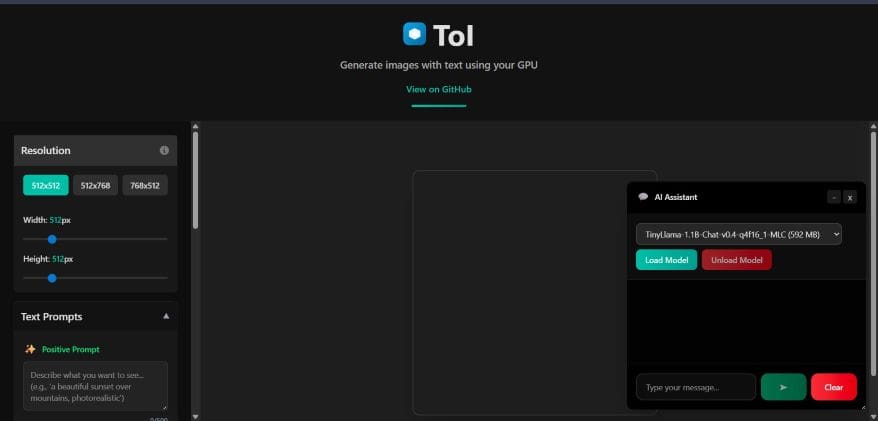
First, open the project link in your browser. The page will load the models. Seeing that these models are large, it takes a moment. This is a one time download/setup process. After that, the files stay in your browser cache. You will not need to download them every time. To point out, I converted several models to the ONNX format. You can choose Small Stable Diffusion for speed. If you want beauty, try animeanything.
- Once the model loads, type in your prompt.
- Adjust your settings on the side.
- I suggest a step count of 20 to 30.
- This provides a good balance of speed and quality.
- Finally, click the generate button.
You will see a real-time preview of your image being generating. This is a very satisfying process to watch.
ToI – Text to Image Generator: Overcoming Technical Constraints
While this may be true, no project is perfect. There are some constraints to keep in mind. To the end that I want transparency, I will list them here. At this point, you must keep one side of your image at 512px. This is due to the model structure. If you go too high, your browser might crash.
Monitoring your VRAM is also important. You can use the browser task manager for this.
If you run out of memory, try a smaller resolution. To put it differently, manage your resources like a pro. Balanced against these limits, the freedom of the tool is worth it.
The Technical Foundation of the Work
I did not build this all by myself. I used great open-source tools. My work relies on onnxruntime-web. This library is very efficient. According to research, latent diffusion models represent a huge leap in image synthesis. They allow for high quality without using too much power. I wanted to bring that efficiency to the web.
To sum up, this project is about empowerment. It shows that we do not need big servers. We have the power in our own hands. In light of recent tech trends, this is a big step. I invite you to try it out. Your feedback helps me improve the code.
Looking Ahead to Future Updates for Browser-Based Stable Diffusion with WebGPU Hardware Acceleration
So far, the project is a success. I plan to add more models soon. I want to include LMS Karras and other samplers. To this end, I welcome contributions from the community. If you are a developer, check out my code. What’s more, I hope to optimize the speed for AMD users.
GitHub Link: https://github.com/asyncdoggo/ToI
Try out the tool. Generate look images. Share your images with me, i would be more than delighted!
In conclusion, the web is growing stronger. We can now run complex AI models in a simple tab. This browser-based Stable Diffusion with WebGPU hardware acceleration is just the start. I am excited to see what you create with it. Let us build a more open world together.
Additionally, to stay updated with the latest developments in STEM research, visit ENTECH Online. Basically, this is our digital magazine for science, technology, engineering, and mathematics. Further, at ENTECH Online, you’ll find a wealth of information.
References:
- Rombach, R., Blattmann, A., Lorenz, D., Esser, P., & Ommer, B. (2022). High-Resolution image synthesis with latent diffusion models. https://openaccess.thecvf.com/content/CVPR2022/html/Rombach_High-Resolution_Image_Synthesis_With_Latent_Diffusion_Models_CVPR_2022_paper.html
- WebGPU Community Group. (2023). WebGPU Specification. W3C. https://www.w3.org/TR/webgpu/