Compare imagetotext.me vs imgtotext.net to find the best OCR tool for your needs. Discover their unique features and benefits.
imagetotext.me vs imgtotext.net – Detailed Comparison

Estimated reading time: 5 minutes
Both imagetotext.me and imgtotext.net are OCR tools. OCR means Optical Character Recognition. These tools take words from pictures and turn them into text you can copy and edit. Both tools work almost the same way and give almost the same results when using the same image. Still, the two tools are different in some ways. They have different upload options, layouts, and features.
About Both Tools: imagetotext.me vs imgtotext.net
imagetotext.me
imagetotext.me is made for speed. It lets users upload many images at one time. This makes it useful for people who often work with screenshots, scanned papers, notes, or document pages.
imgtotext.net
imgtotext.net is made for easy uploads and cloud use. Along with normal uploads from a device, users can also bring images from Dropbox. This helps people who keep files online and want a way to use them. It also has a translation feature that lets you change the output after extraction into a different language.
Feature Comparison Table
| Feature | imagetotext.me | imgtotext.net |
| OCR Accuracy | High | High |
| Output Quality | Same | Same |
| Batch Processing | Yes (up to 5 images) | No visible batch support |
| Dropbox Import | No | Yes |
| Drag & Drop Upload | Yes | Yes |
| URL Upload | Yes | Yes |
| Translation and Comparison | No | Yes |
| Supported Formats | PNG, JPG, WEBP, GIF, PDF | PNG, JPG, JPEG, GIF, JFIF, PDF, WEBP, BMP, HEIF, HEIC |
| Interface Style | Functional and productivity-focused | Minimal and cloud-oriented |
| Best For | Bulk OCR tasks | Cloud-based workflows |
UI and User Experience
imagetotext.me Interface
The layout on imagetotext.me is made for easy and fast work. The upload box is large and simple to understand. The buttons for image uploads and links are easy to see.
One big feature is batch processing. Users can upload up to five images at once. This helps avoid uploading the same way again and again. It also makes the tool useful for people working with screenshots or scanned papers.
The results area is also helpful. It shows the extracted text and gives buttons for copying or downloading the text.
imgtotext.net Interface
imgtotext.net has a cleaner and simpler design. The upload area looks less crowded and has fewer things on the screen.
Its biggest feature is Dropbox support. Users can add images straight from Dropbox without saving them first on their computer. This is useful for teams, students, and people using many devices.
OCR Performance in imagetotext.me vs imgtotext.net
We tested both tools with the following images:
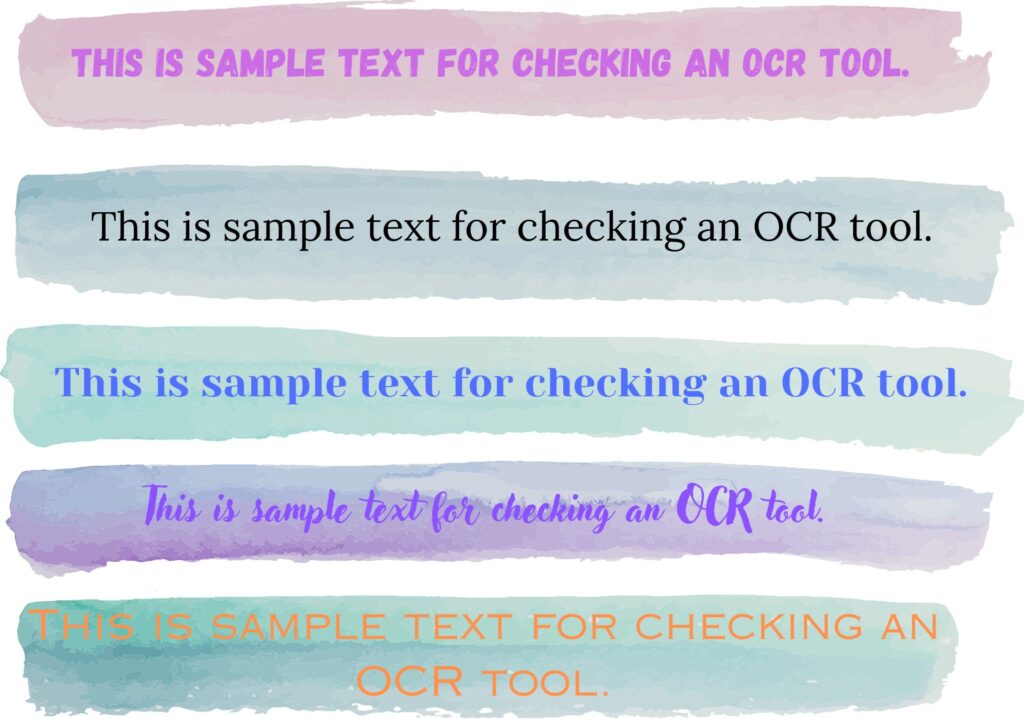
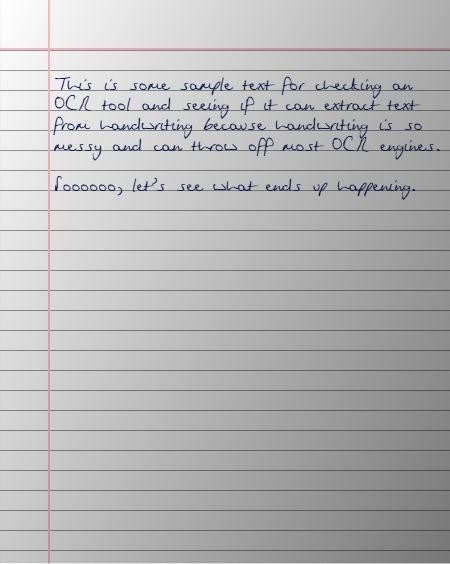
These images help to check the accuracy of the tools in all kinds of scenarios. The first image provides various types of contrasts that will push the OCR algorithm to its limits, while the second image provides irregular handwriting that provides a different type of challenge.
Let’s see how each tool performed.
imagetotext.me
Here’s what this tool did with both images. It was able to process both at once due to the batch processing feature. The output was as follows:
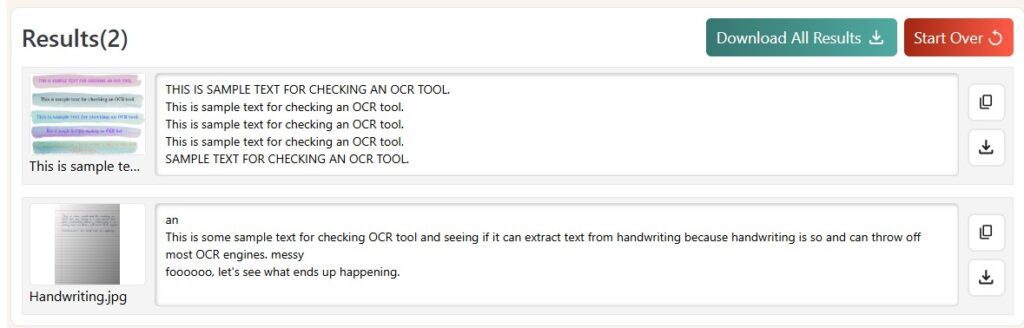
For the most part, the tool performed well. It only made two mistakes. In the first image, it was unable to recognize two words in the sentence with the least contrast.
In the second image, it misrecognized an “s” as an “f”. These are small mistakes and can be easily corrected.
Now, let’s see the other tool.
imgtotext.net
This tool required us to use it twice because it has no batch processing feature. So, that was a little bit inconvenient. Here’s how it performed.
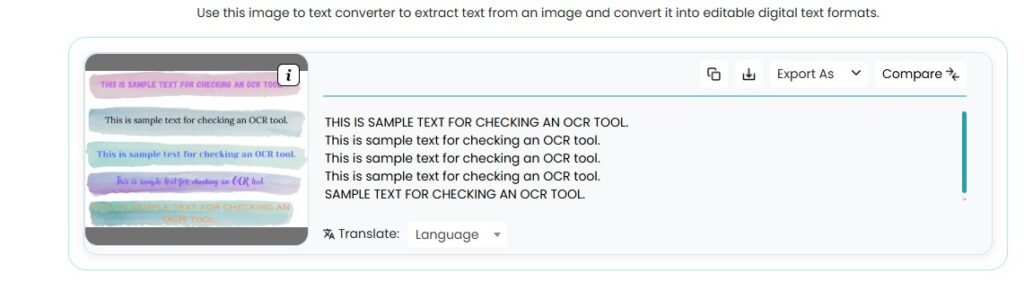
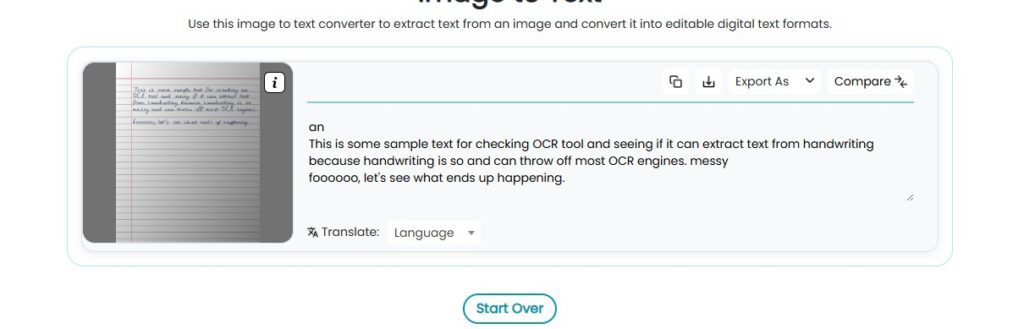
Surprisingly, it performed exactly the same. So it means both have the same OCR capabilities.
Also Read: How to Convert Static Image Data to an Editable Document?
Which Tool Is Better: imagetotext.me vs imgtotext.net?
Since both tools perform the same, it means we can only compare them on their other features. Let’s take a look at them now.
Choose imagetotext.me if:
- You often change many images into text at one time.
- You want batch processing.
- You like a layout made for fast work.
- You work with scanned papers or screenshots often.
- You want more ease while working.
Choose imgtotext.net if:
- You store files on Dropbox.
- You prefer a simpler interface with fewer on-screen controls.
- You want a translation feature in the text extractor.
So, that’s what the decision boils down to. If you need a translation feature, then imgtotext.net is good. If you need batch processing, then imagetotext.me is far better. Your use case will determine which tool suits you more.
imagetotext.me vs imgtotext.net: Final Verdict
Both tools are good OCR solutions, and both give dependable image to text conversion. Since the OCR quality is almost the same, the best choice depends on what features matter more to you.
From this comparison, imagetotext.me is better for batch work and fast processing. On the other hand, imgtotext.net is more useful for Dropbox users and people who want translation support too.
For users who work with many files every day, imagetotext.me gives a faster workflow. For users who mainly use online stored images, imgtotext.net gives upload freedom and a smoother cloud based experience.
- Author
- Latest Posts

A driven and dedicated IT professional specializing in web development and research. Backed by a strong academic foundation and extensive hands-on experience at Coneixement INDIA, I consistently deliver innovative, high-quality digital solutions that enhance user experience and drive measurable business growth.
With a passion for continuous learning and advancing my technical expertise, I am eager to take on new challenges in dynamic, larger organizations where I can contribute to transformative projects, optimize digital strategies at scale, and help elevate the company’s online presence. My commitment to excellence, combined with a results-oriented approach, makes me a valuable asset ready to support business objectives and future-proof digital initiatives in competitive markets.


