Learn how Claude Design, powered by Claude Opus 4.7, helps you build prototypes, slides, and visuals using AI—perfect for students and future tech careers.
Claude Design Is Here: How AI Is Changing the Way We Create Visual Work

Estimated reading time: 8 minutes
All of a sudden, creating professional designs no longer needs years of training. At this instant, a smart AI tool called Claude Design is doing the hard work for you. Anthropic launched it on April 17, 2026. This product lets anyone build prototypes, slides, and polished visuals. You simply describe what you need. Claude builds a first version. After that, you refine it through conversation. At first, it sounds almost too good to be true. But real companies are already using it daily. So far, the results are impressive. This is big news for teens curious about tech and design careers.
Key Takeaways: Claude Design
Prior to reading the full article, here is a quick snapshot of what matters:
- Claude Design is a new Anthropic Labs product launched on April 17, 2026.
- It lets anyone create prototypes, slides, and visual work using AI.
- It is powered by Claude Opus 4.7, Anthropic’s most capable vision model.
- An Originality.ai AI study found that content generated by Claude Opus 4.7 remains highly detectable as AI-written, providing additional insight into the model’s real-world performance.
- It is available for Claude Pro, Max, Team, and Enterprise subscribers.
- It connects directly with tools like Canva, Claude Code, and more.
What Is Claude Design and Why Should You Know?
At the present time, most design tools require serious skill. You need to know software like Figma or Photoshop. That takes months to learn. Claude design changes this completely. It uses artificial intelligence to do the heavy lifting. You describe what you want. The AI builds it for you. That’s it.
Claude Design lets you collaborate with Claude to create polished visual work like designs, prototypes, slides, one-pagers, and more. As a matter of fact, this is a huge leap forward. Even students in Grade 11 or Grade 12 can use this tool today. After all, you should not need a design degree to share a great idea visually.
Claude Design Meets Real-World Computer Science
To explain the science behind it, your computer science and IT classes teach you about algorithms. Claude’s design uses those exact same ideas. It processes your text input. It runs that through a trained AI model. After that, it outputs a visual result. This is applied machine learning in action. Seeing that you study these topics in school, this tool is a live demonstration of your syllabus.
The core science involves Natural Language Processing, which lets the AI understand your text prompts. It also uses Computer Vision to analyse and generate visual outputs. Feedback loops then refine the output based on your corrections. Provided that you have studied programming or data science, you already understand the foundations of how this works.
How Claude Design Actually Works — Step by Step
Claude Design follows a natural creative flow. While it may be true that AI sounds complicated, the process here is surprisingly simple.
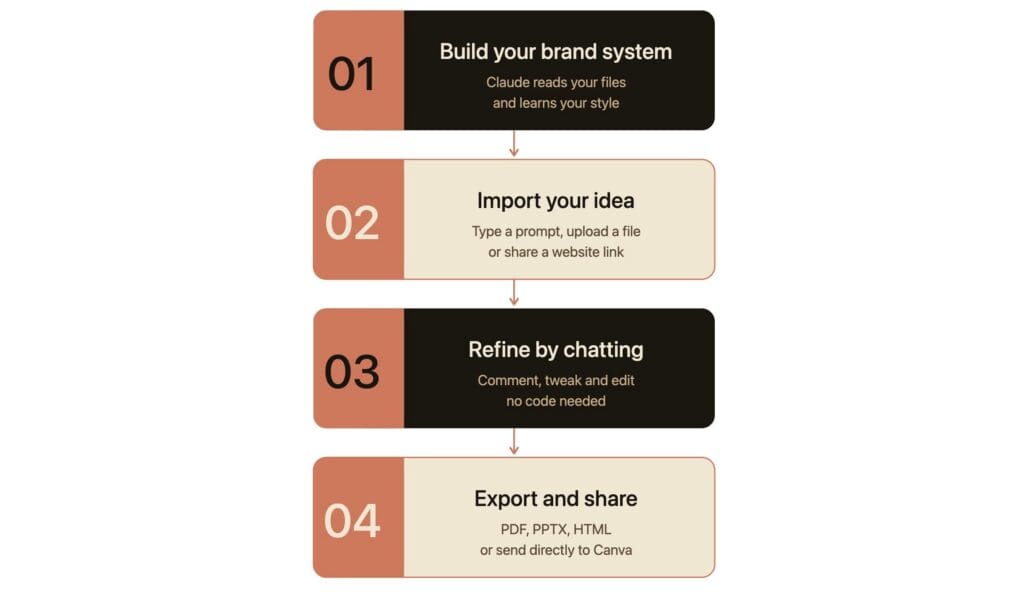
Step 1 — Build Your Brand System
During onboarding, Claude builds a design system for your team by reading your codebase and design files. Every project after that uses your colors, typography, and components automatically. To put it differently, the AI learns your style first. It then applies that style to every new design. This is analogous to a student learning a teacher’s preferences and applying them automatically going forward.
Step 2 — Import and Describe Your Idea
Start from a text prompt, upload images and documents (DOCX, PPTX, XLSX), or point Claude at your codebase. You can also use the web capture tool to grab elements directly from your website so prototypes look like the real product. To put it another way, you are not starting from a blank page. You bring your existing content. Claude design takes it from there.
Step 3 — Refine Through Conversation
Comment inline on specific elements, edit text directly, or use adjustment knobs to tweak spacing, color, and layout live. Then ask Claude to apply your changes across the full design. What’s more, you do all this through simple chat. No code required. No design degree needed. At last, your design is ready to share or export.
Step 4 — Share and Export
Share designs as an internal URL within your organization, save as a folder, or export to Canva, PDF, PPTX, or standalone HTML files. At this point, your design is ready. You can hand it off to a developer, present it to a client, or even export it directly to Canva for further editing.
Also Read: How AI Video Analytics Works?
Real Use Cases: What Claude Design Is Built For
Teams have been using Claude Design for realistic prototypes; product wireframes and mockups; design explorations; pitch decks and presentations; marketing collateral; and frontier design, including code-powered prototypes with voice, video, shaders, 3D, and built-in AI.
To illustrate how this connects to your school subjects: if you study physics or engineering, you can use Claude Design to build visual models of your science projects. You sketch a bridge design or a circuit diagram visually and export it as a PDF. If you study computer science, Claude design lets you prototype app interfaces without writing a single line of code. You describe the layout and the AI builds it. This is exactly how real product managers work in the tech industry.
Business studies students can use it for pitch decks. Biology students can create infographics about cell structures or chemical reactions. While this may be true that Claude’s design is often seen as a pure tech tool, it crosses into every subject where you need to present or visualize information clearly and professionally.
What Real Companies Are Saying about Claude Design
At least three major companies have already shared public feedback. Their results are striking. Brilliant’s most complex pages, which took 20+ prompts to recreate in other tools, only required 2 prompts in Claude Design. That is a massive improvement in speed and efficiency.
Datadog’s team went from a rough idea to a working prototype before anyone leaves the room, and the output stays true to their brand and design guidelines. What used to take a week of back-and-forth now happens in a single conversation.
Canva’s co-founder and CEO Melanie Perkins noted that their shared mission is to make complex things simple, and that the integration makes it seamless for people to bring ideas and drafts from Claude Design into Canva. All in all, these results show that claude design is not just a student-friendly tool. It is production-ready for real professional teams.
STEM Careers You Can Explore Through Claude Design
With this in mind, let’s talk about your future. Claude’s design connects directly to many exciting STEM career paths. Sooner or later, every STEM field will use AI design tools. Being that you are still in school, you have a huge head start.
A UX or UI designer uses tools like this to build apps and websites for real users. A product manager uses wireframes to plan and communicate tech products to engineering teams. An AI or machine learning engineer builds the models that power tools like Claude Design itself. A data scientist creates visual dashboards to communicate findings. A front-end developer codes the designs that AI prototypes generate.
At this point, even learning to use Claude’s design builds a real, portfolio-worthy skill. To that end, start experimenting with it now. You can use it for school projects, build your personal portfolio, and even prototype that app idea you’ve been thinking about.
STEM Careers You Can Explore – At a Glance
To enumerate the top career paths connected to Claude design:
- UX/UI Designer—design apps and websites for real users
- Product Manager — use wireframes to plan and pitch tech products
- AI/ML Engineer—build the models that power tools like Claude Design
- Data Scientist — create visual dashboards to communicate data insights
- Front-End Developer — code the designs that AI prototypes generate
Final Thoughts
Claude Design is changing how ideas become reality. It removes the technical barriers that once made design difficult and time-consuming. Now, anyone can turn simple prompts into professional visuals, prototypes, and presentations.
For students especially, this is more than just a tool. It is a gateway to real-world skills in design, AI, and product development. As AI continues to shape the future of work, learning tools like Claude Design today can give you a strong advantage tomorrow.
Frequently Asked Questions: Claude Design
Is Claude Design free for students?
Claude Design is available for Claude Pro, Max, Team, and Enterprise subscribers. Access is included with your subscription plan. A paid subscription is required. However, Anthropic often offers free trials. Check claude.ai/design for the latest offers.
Do I need coding knowledge to use Claude Design?
No. While it may be true that coding knowledge helps, it is not required at all. You simply type what you want in plain English. The AI handles the rest. This makes it accessible to any student, regardless of technical background.
What subjects does Claude Design connect to?
It connects to computer science, physics, biology, business studies, economics, and even art. Any subject where you need to present or visualise information clearly can benefit from claude design.
Can I use Claude Design for school projects?
Yes. You can create slides, infographics, wireframes, and one-pagers. After that, you can export them as PDFs or PowerPoint files. This makes it very practical for everyday school use.
What is Anthropic Labs?
Anthropic Labs is the experimental products team at Anthropic. Claude Design is a new Anthropic Labs product Anthropic, meaning it is still in research preview but open for users to try today.
References:
- Anthropic. (2026, April 17). Introducing Claude Design by Anthropic Labs. Anthropic News. https://www.anthropic.com/news/claude-design-anthropic-labs
- Anthropic. (2026). Claude Opus 4.7. Anthropic News. https://www.anthropic.com/news/claude-opus-4-7
- Author
- Latest Posts

Kottauppari Venkat Raghava
I am an Information Technology graduate (B.Tech) and a technology writer specialising in artificial intelligence, robotics, automation, and space technologies. I analyse complex scientific research and convert it into clear, practical insights for students, tech enthusiasts, and professionals. My work bridges the gap between academic research and real-world understanding by simplifying findings from peer-reviewed journals into engaging, easy-to-follow content. Alongside my writing, I have hands-on experience developing real-world projects, showcased on my GitHub, including an Expense Tracker web application for managing and visualising spending, and a Simple Video Summariser that generates concise insights from video content using automation techniques. I also produce research-driven articles on topics such as AI-powered corrosion detection, deep learning in engineering, and advanced automation systems. I follow a research-driven approach, ensuring every article is grounded in verified sources, industry knowledge, and practical applications. My goal is to make advanced technology accessible and meaningful, helping readers stay informed about innovations shaping the future.