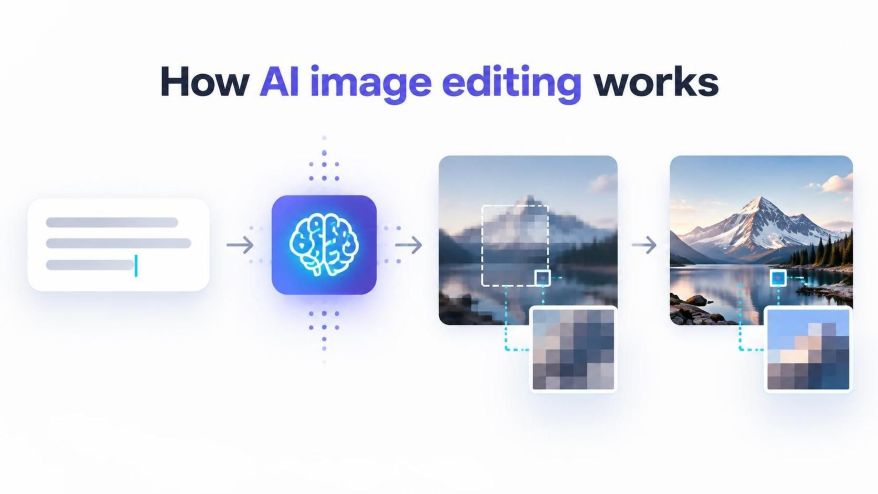
Imagine taking a photograph of a brown leather bag and changing its color to red without photographing it again. Traditionally, this task would involve selecting the bag, creating a mask, adjusting its colors, and refining the edges to preserve its original appearance. AI image editing offers another approach. Instead of manually selecting every boundary, users can describe the required change in a natural-language prompt.
This process combines computer vision, machine learning, and generative AI to interpret an image and modify selected elements. It allows users to make changes such as replacing object colors, removing backgrounds, modifying textures, and adding or removing visual elements.
Understanding how this technology works reveals why AI image editing is different from conventional photo manipulation.
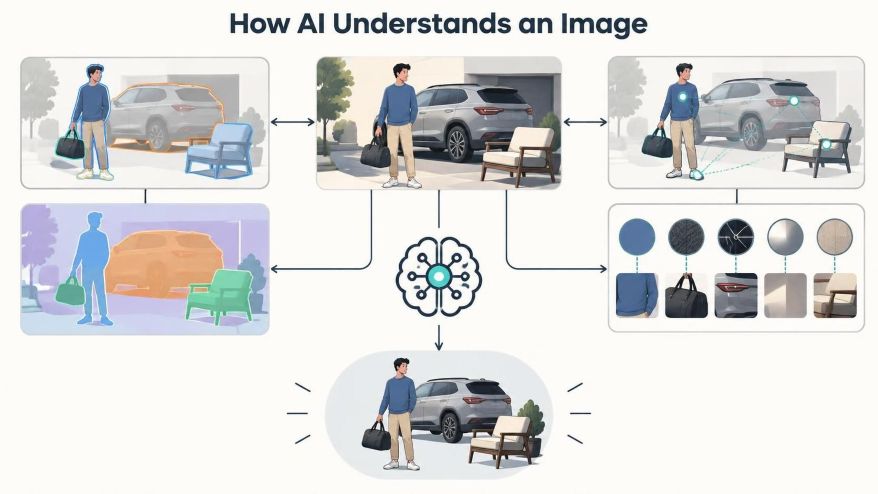
How AI Understands an Image?
Fig. 1: Illustration – How AI Understands an Image
When a user uploads a photograph to an AI image editing system, the model processes its visual information to identify patterns, objects, and relationships within the composition.
This involves several interconnected capabilities:
Object recognition: Identifies familiar objects, such as bags, shoes, vehicles, people, and furniture.
Semantic understanding: Interprets what different elements represent and how they relate to one another.
Image segmentation: Helps distinguish individual objects and regions from their surroundings.
Visual feature extraction: Analyses characteristics such as colour, texture, edges, lighting, and shape.
Together, these capabilities help an AI system interpret an image beyond its individual pixels.
For example, when processing a photograph of a leather bag, the system may identify the main body, handles, metal fittings, background, and surrounding surfaces as different visual elements. This understanding provides a foundation for making targeted modifications.
However, AI does not necessarily create a perfect object map before every edit. Different models use different architectures and processing methods, and their ability to distinguish individual elements depends on the image and the requested transformation.
How Text Prompts Translate into Image Changes?
Natural-language prompts provide instructions that guide the editing process. Instead of manually selecting an object, a user can describe what should change.
Consider the instruction: Change the color of the bag to red.
The AI system interprets the instruction by identifying three important components:
Target object: The bag.
Requested modification: A color change.
Desired appearance: Red.
The model then generates an edited image that attempts to satisfy these instructions while maintaining the surrounding composition.
This process involves connecting language representations with visual information. The system must understand which object the prompt refers to, identify its relevant visual features, and determine how the requested change should affect the image.
For example, changing a brown leather bag to red should ideally preserve its original shape, stitching, handles, shadows, and surface texture. Only the requested visual attribute should change.
This is one reason prompt clarity matters. A specific instruction generally gives the model a clearer editing objective than a vague description such as “make the bag look different.”
How AI Changes One Object Without Altering the Entire Image
One of the important challenges in AI image editing is maintaining consistency between the modified object and the rest of the photograph.
A useful concept here is image inpainting.
Image inpainting refers to the process of reconstructing or generating visual content within a selected or identified region of an image. Although it has traditionally been associated with filling missing or damaged areas, generative AI has expanded its applications to object modification and scene editing.
In a prompt-based editing workflow, the model may use image segmentation, contextual information, and generative techniques to determine which regions need modification.
For instance, changing a bag’s color requires more than replacing brown pixels with red ones. The system must account for the object’s shape, surface variations, shadows, highlights, and surrounding lighting.
A simplified workflow looks like this:
The system analyses the uploaded image.
It interprets the text instruction.
It identifies the relevant object or image region.
It generates modified visual content.
It combines the modified content with the surrounding composition.
It produces the final edited image.
The actual implementation may differ between AI models. Some use explicit masks or region-based processing, while others rely on latent representations and generative conditioning.
The objective, however, remains similar: modify the requested element while preserving visual consistency across the composition.
Combining Multiple Editing Instructions
AI image editing systems can also interpret prompts containing more than one instruction.
Consider this example: Change the shoe color to navy blue and remove the background.
This request contains two separate editing objectives:
Modify the shoe’s colour.
Remove the surrounding background.
The system must identify the footwear, understand its visual boundaries, change its appearance, and distinguish it from the environment.
These operations involve different types of image processing. Color modification changes the appearance of an existing object, whereas background removal separates the foreground subject from the surrounding scene.
The resulting image should ideally retain the shoe’s original shape, material details, and proportions while removing unwanted background elements.
However, combining multiple instructions increases the number of constraints the model must satisfy. If the instructions involve complex objects, overlapping elements, or significant scene changes, the output may contain inconsistencies.
For this reason, breaking a complex assignment into smaller editing steps can sometimes produce more predictable results.
AI Image Editing Versus Traditional Layer-Based Editing
Traditional image editing software and generative AI systems approach image modification differently.
In conventional raster editing, users work with layers, selections, masks, and adjustment tools. Each operation provides a degree of manual control over specific parts of an image.
For example, changing a bag’s color in a traditional editor may involve:
Selecting the bag using a selection or pen tool.
Creating a mask around its boundaries.
Applying a colour adjustment.
Refining the mask around handles, stitching, and other details.
Adjusting highlights and shadows to maintain a realistic appearance.
An AI-powered workflow can simplify these steps by interpreting a natural-language instruction and generating the modified result.
Aspect
Traditional image editing
AI image editing
Object selection
Often requires manual selection
Can use AI-based object recognition and segmentation
Instructions
Tool-based operations
Natural-language prompts
Editing process
Layer and mask manipulation
Model-guided image generation
Precision
Offers detailed manual control
Depends on model interpretation
Complex changes
Often require several editing operations
May combine multiple changes in one prompt
Output consistency
Controlled through manual adjustments
May vary between generations
Neither approach replaces the other in every situation.
Traditional editing remains valuable when exact pixel-level control, repeatability, and precise adjustments are essential. AI image editing is useful when users want to explore visual changes quickly without performing every selection and adjustment manually.
Some modern workflows combine both approaches, using AI for initial transformations and conventional editing tools for final refinements.
AI image editing does not guarantee that every instruction will produce the intended result on the first attempt.
Simple transformations, such as changing the color of an isolated object, are generally less demanding than modifications involving complex structures or entire environments.
Several factors influence the quality of the output.
Image quality: Blurry photographs, poor lighting, and low resolution can make it difficult for a model to distinguish object boundaries and surface details.
Prompt clarity: Instructions that do not clearly identify the target object or desired modification can lead to unintended changes.
Scene complexity: Modifying several objects or changing the environment requires the model to maintain consistency across multiple visual elements.
Model limitations: Generative models may alter details that were not included in the original instruction. They can also introduce visual inconsistencies or produce details that were not present in the source photograph.
An iterative approach can help address these limitations. A user might first change an object’s color, inspect the result, and then request a separate background modification.
This gives the model a narrower objective during each generation step and makes it easier to identify which instruction caused an unwanted change.
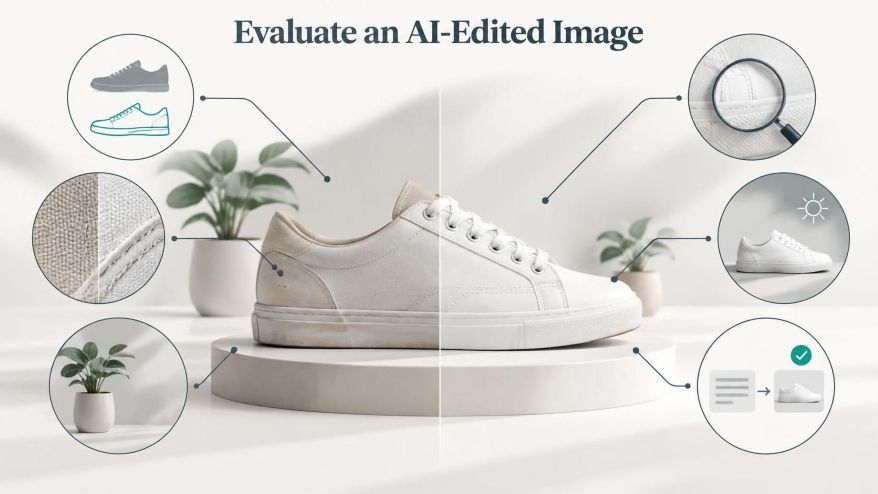
How to Evaluate an AI-Edited Image?
Fig. 2: Illustration – Evaluate AI-edited Image
A generated image should not be considered accurate simply because it looks visually appealing. It should also satisfy the original editing requirements.
A useful quality inspection involves comparing the edited image with its original version.
Consider the following checks:
Object identity: Does the modified object retain its original shape and proportions?
Boundary accuracy: Are the edges clean, without unwanted blending into the background?
Texture preservation: Are details such as stitching, grain, fabric patterns, and surface finishes still consistent?
Lighting consistency: Do highlights, shadows, and reflections appear natural?
Unintended changes: Have other objects or background elements changed unexpectedly?
Instruction accuracy: Does the result match the requested modification?
These checks are particularly important when AI-generated images are used in educational assignments, presentations, product demonstrations, or technical illustrations.
For students exploring these tools, experimenting with a simple instruction such as changing an object’s color can provide a useful introduction to prompt-based editing. An AI image editor can serve as an example of an interface where users communicate visual modifications through text prompts rather than relying entirely on manual selection tools.
The important learning outcome is understanding how the instruction, the original image, and the AI model work together to produce a modified visual result.
The Future of Prompt-Based Image Editing
AI image editing is changing how people interact with digital images. Tasks that once required detailed knowledge of selection tools, masks, and adjustment layers can increasingly be performed through natural-language instructions.
The technology also introduces new challenges involving visual accuracy, object preservation, consistency, and control over generated content.
As computer vision and generative models continue to develop, image editing systems are likely to offer more precise object-level modifications and better control over individual visual attributes.
However, understanding the underlying technology remains important. AI-generated results require evaluation, and human judgement continues to play a role in determining whether an edit is accurate and appropriate for its intended purpose.
Learning how these systems interpret images, process instructions, and generate visual changes provides a useful foundation for anyone exploring the intersection of artificial intelligence and digital creativity.
Nguyen, T. T., Ren, Z., Pham, T., Nguyen, P. L., Nguyen, Q. V. H., & Yin, H. (2025). A review of instruction-guided image editing. Engineering Applications of Artificial Intelligence, 163, 112953. https://doi.org/10.1016/j.engappai.2025.112953
Sun, Z., Fang, H., Cao, J., Zhao, X., & Wang, D. (2024). Rethinking image editing detection in the era of generative AI revolution. ACM International Conference on Multimedia (ACM MM), 3538–3547. https://doi.org/10.1145/3664647.3681445
Hrutanshu Kurankar is a Computer Engineering graduate from Marathwada Mitra Mandal’s College of Engineering, Pune. His interests span artificial intelligence, machine learning, cybersecurity, data science, and science communication. He enjoys exploring how emerging technologies work and translating complex technical concepts into clear, accessible explanations for students and young audiences.
His practical experience includes developing FlashCTI, a Retrieval-Augmented Generation (RAG) system for cyber threat intelligence and log analysis, exploring privacy-focused browser extensions, and building machine learning applications. His technical background includes Python, data analysis, machine learning frameworks, web development, vector databases, and cybersecurity tools. Through these projects, he has developed an interest in applying technology to real-world problems and making technical knowledge easier to understand.
Hrutanshu is associated with ENTECH STEM Magazine, where he contributes to science communication and editorial initiatives, including research outreach and activities supporting the Machine Learning Special Issue 2026. His work involves connecting with potential contributors and academic reviewers to encourage participation in STEM research and knowledge sharing. As a science communicator, he aims to bridge the gap between complex scientific ideas and everyday understanding through relatable examples, clear writing, and evidence-based explanations. He is particularly interested in making science and technology engaging and accessible to the next generation of learners.