108 Chrome extensions were discovered spying on users and quietly stealing personal data through hidden malware.
Malicious Chrome Extensions Affect 20,000 Users

Estimated reading time: 6 minutes
Cybersecurity researchers have found a serious online threat. They discovered 108 malicious Chrome extensions stealing user data. These extensions affected people around the world.
At first, the extensions looked safe. They were listed on the Chrome Web Store as useful tools. Some offered games, while others claimed to boost productivity. Many users trusted them and installed them.
However, these tools had a hidden purpose. They collected user data and sent it to remote servers. Reports show that about 20,000 users were affected.
This case shows how simple tools can hide real dangers. It also shows how attackers are getting smarter. They can now make harmful software look safe and helpful.
Key Findings
- Coordinated attack: All 108 extensions used one control server.
- Trusted look: They appeared as normal and helpful tools.
- Data theft: They collected user data without notice.
- Backdoor access: Attackers could control browsers from afar.
- Wide impact: About 20,000 users were affected.
What Happened in This Attack?
Researchers found that this was not a random attack. It was a planned campaign. The extensions looked like they came from different developers. In reality, they were all linked.
Each extension connected to the same command-and-control server. This server acted as the main control center. It allowed attackers to manage all infected browsers.
The extensions worked in the background. At the same time, they still did what they promised. Because of this, users did not suspect anything.
Most users thought they installed helpful tools. Instead, they installed spyware. These extensions tracked user activity and collected data.
This made the attack hard to detect. It also helped it spread quickly.
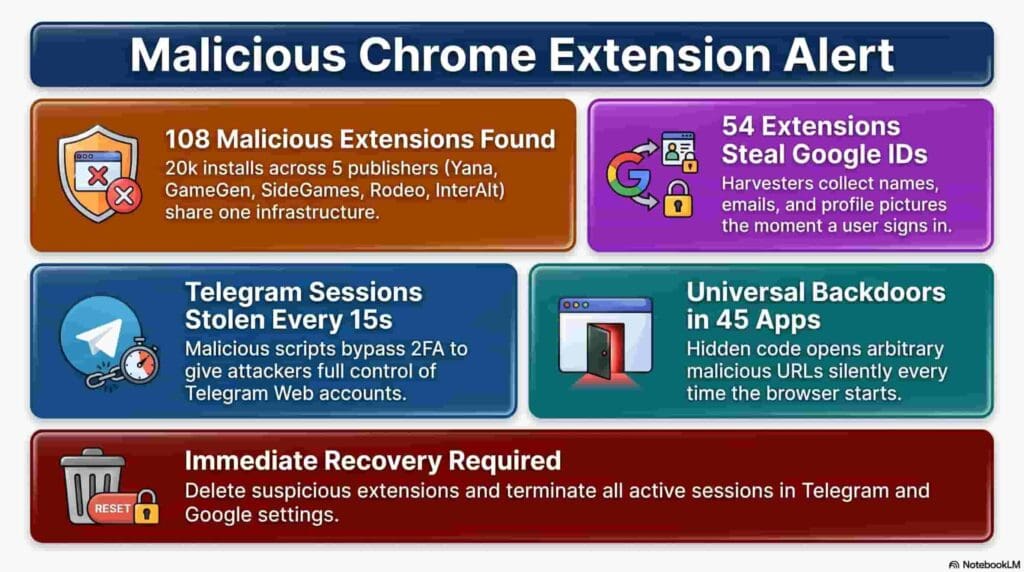
How Malicious Chrome Extensions Work
Disguised as Everyday Tools
Attackers made these extensions look normal. They copied popular types of apps. These included messaging tools, games, video helpers, and work tools.
People use these types of apps every day. Because of this, they trusted them. Many users installed them without thinking twice.
This simple trick helped attackers reach more users.
Hidden Data Collection
Once installed, the extensions started collecting data. They used the permissions given by the browser.
They could access account details, browsing history, and session data. In some cases, they also captured login information during sign-in.
This process was silent. Users did not see any warning signs.Over time, attackers could gather a lot of data from each user.
Backdoor Access of Malicious Chrome Extensions
Many of these extensions had hidden backdoor features. These gave attackers control over the browser.
Attackers could send commands to the browser at any time. They were also able to open websites or redirect users. In addition, they could track sessions in real time.
This meant the attack did not stop after installation. It could continue and even grow worse.
Why These Extensions Are Dangerous
Browser extensions need deep access to work well. They can read and change web pages. They can also interact with user data.
Malicious extensions misuse this access. They can steal personal data without slowing the system. They can also capture login details and track user activity.
One big problem is that they are hard to notice. Most users do not check their extensions often. They also do not review permissions.
Because of this, these threats can stay active for a long time.
Real-World Impact
This attack affected about 20,000 users. This number shows how fast such threats can spread.The attackers used fake developer accounts. This made the extensions look unrelated. In reality, they were all part of one system.
This setup made it easy to control everything from one place. It also helped attackers grow their network.Users who installed these extensions had their data exposed. Their browsing habits were tracked. Their account details were also at risk.
This case shows that even trusted platforms can be misused. It reminds users to stay careful online.
How to Stay Safe from Malicious Chrome Extensions
- Enable security features:
Turn on built-in protections like safe browsing to add an extra layer of safety. - Check extensions often:
Review your installed extensions and remove any you no longer use. This helps reduce risk. - Review permissions:
Always check what access an extension requests before installing it. Avoid tools that ask for too much. - Choose trusted developers:
Install extensions only from reliable sources. Look at reviews and ratings before making a decision. - Keep your browser updated:
Updates fix security issues and improve protection against new threats.
STEM Topics and Skills
This case connects strongly to several STEM fields and real-world learning.
First, cybersecurity focuses on protecting systems from threats like malicious extensions. In addition, computer science explains how browsers and extensions work. Similarly, network security shows how data moves between systems and how attackers use command-and-control (C2) servers.
Moreover, data privacy teaches how personal information is collected and misused. At the same time, ethical hacking helps identify and fix security flaws before attackers exploit them. Likewise, digital forensics is used to trace how attacks happen and spread. Furthermore, human-computer interaction explains why users trust unsafe tools and how design influences behavior.
From this case, students also gain important practical skills. For example, they learn to check permissions before installing software and think critically about digital tools. As a result, they become better at spotting risks and protecting personal data online.
Overall, this example shows that STEM is not only about building technology. Instead, it is also about understanding risks and using technology safely and responsibly.
Final Thoughts on Malicious Chrome Extensions
The discovery of these 108 malicious Chrome extensions is a warning. In fact, it clearly shows a major gap in browser security. Although these tools looked helpful, they actually acted as spyware. As a result, they secretly collected user data and gave control to attackers.
Therefore, users must stay alert at all times. In addition, simple habits like checking permissions before installation and removing unused tools can greatly reduce risk. Moreover, reviewing browser extensions regularly can help prevent hidden threats. Ultimately, these small steps can make a big difference in staying safe online.
Additionally, to stay updated with the latest developments in STEM research, visit ENTECH Online.
Frequently Asked Questions
What are malicious Chrome extensions?
They are browser add-ons designed to steal data or perform harmful actions without user consent.
How many users were affected in this attack?
Around 20,000 users installed these malicious extensions.
What kind of data was stolen?
User account details, browsing activity, and authentication data were collected.
How can I protect myself?
Avoid unknown extensions, review permissions, and use trusted sources only.
Reference
- Socket. (2026). 108 Chrome extensions linked to data exfiltration and session theft via shared C2 infrastructure. Socket Blog. https://socket.dev/blog/108-chrome-ext-linked-to-data-exfil-session-theft-shared-c2
- Author
- Latest Posts

Kottauppari Venkat Raghava
I am an Information Technology graduate (B.Tech) and a technology writer specialising in artificial intelligence, robotics, automation, and space technologies. I analyse complex scientific research and convert it into clear, practical insights for students, tech enthusiasts, and professionals. My work bridges the gap between academic research and real-world understanding by simplifying findings from peer-reviewed journals into engaging, easy-to-follow content. Alongside my writing, I have hands-on experience developing real-world projects, showcased on my GitHub, including an Expense Tracker web application for managing and visualising spending, and a Simple Video Summariser that generates concise insights from video content using automation techniques. I also produce research-driven articles on topics such as AI-powered corrosion detection, deep learning in engineering, and advanced automation systems. I follow a research-driven approach, ensuring every article is grounded in verified sources, industry knowledge, and practical applications. My goal is to make advanced technology accessible and meaningful, helping readers stay informed about innovations shaping the future.