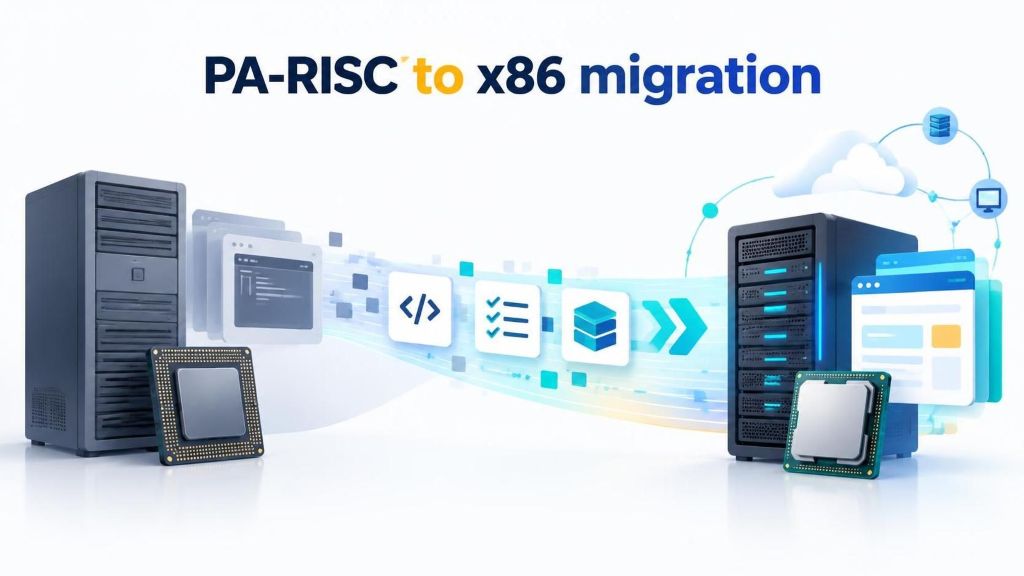
Any CPU architecture remains successful for a couple of decades before the company producing it develops a more modern one. They find new trends they can use for their computers, and they decide to incorporate them into the new architecture. The same thing happened with the PA-RISC architecture that was created by HP. PA-RISC processors were developed till 2005, after which the Itanium architecture took over. HP focused all its attention on Itanium processors then. However, enterprises using PA-RISC could not move to a new processor that easily. The servers still worked perfectly and gave the expected results. Consequently, planning a complete PA-RISC to x86 migration – or moving to another modern platform – proved hard, expensive, and time-consuming.
Despite these hurdles, staying with PA-RISC long after its end-of-life (EOL) remains quite difficult. In the following sections, we will explain why.
Why are PA-RISC Computers Failing?
After 2008, HP discontinued the sale of PA-RISC entirely; support stopped after 2013. No official assistance could thus be obtained anymore. As a result, enterprises face the following problems:
Lack of Support: PA-RISC hardware did not get any more improvements after 2005. It continued till the 64-bit PA-RISC 2.0 (PA 8900 was the last model), but better PA-RISC processors were not made after that.
Performance Limitations: Due to PA-RISC hardware being outdated, it does not perform as well as modern hardware. Compatibility with contemporary systems has challenges too.
Hardware Failures: You see PA-RISC hardware failing often. The rate increases as the infrastructure ages more and more, until you face complete shutdown. Maintenance and repairs have also become increasingly difficult.
Rarity of Parts and Repairers: It is also difficult to repair PA-RISC because of how scarce spare parts are now. It is equally difficult to find repair experts, since they rarely deal with aging PA-RISC hardware now.
Costly Maintenance: Maintenance becomes expensive too. Because instances of repair come often, replacement parts are costly, and technical experts charge more, you have to spend more to keep the PA-RISC hardware working properly.
PA-RISC to x86 migration: How Can You Move Your HP-UX Applications?
You realize that the best way to solve all your PA-RISC obsolescence problems is through modernization. However, doing that translates to the disruption of business continuity and immense expenses.
What if there’s an easier way to prevent such a problem? There are actually two! Emulation and virtualization are lifesavers when you want to migrate from your PA-RISC hardware to x86 architecture, but retain your HP-UX software entirely to maintain your workload.
Let us explain what they mean.
Emulation
When planning a PA-RISC to x86 migration, emulation serves as an effective process for recreating the HP-UX environment on modern x86 hardware without requiring any code changes. Specifically, an emulation software sits directly between the HP-UX operating system, its applications, and the underlying x86 hardware.
Whenever a command comes from HP-UX, the emulation software first interprets or translates it. Next, the instruction passes to the x86 server. As a result, the HP-UX applications remain under the impression that a native PA-RISC-based server produced the output.
As noted previously, emulation can operate via an interpreter or a binary translator. On one hand, an interpreter changes each HP-UX command one by one; while slower, this method offers high accuracy. On the other hand, a binary translator processes chunks of commands simultaneously. Consequently, it is much more efficient, although its technical implementation is more complex.
Virtualization
In virtualization, a physical server, in this case, x86, is divided into multiple virtual versions, called virtual machines. Each of them is isolated from the others, working independently. The software that enables this division is the hypervisor.
The CPU, storage, memory, and network interfaces of the x86 are all abstracted and distributed among the virtual machines based on their needs. This improves resource allocation, preventing server sprawl and increasing efficiency.
During a PA-RISC to x86 migration, infrastructure consolidation becomes a primary goal. Legacy PA-RISC hardware typically consumed massive amounts of power, occupied valuable floor space, and required elaborate cooling systems. In comparison, running HP-UX applications inside dedicated virtual machines on modern x86 servers eliminates these physical burdens, providing an ideal modernization path for enterprises.
Most companies nowadays depend on cloud migration to reduce hardware dependency. If you still run legacy infrastructure, executing a successful PA-RISC to x86 migration allows you to move your HP-UX applications straight to the cloud. Fortunately, both emulation and virtualization make this transition entirely possible.
In either case, you get the same effect as without the cloud. However, now you can enjoy their benefits without having to worry about taking care of the x86 server. Instead, your cloud provider handles that infrastructure for you.
You get ultimate hardware efficiency. Maintaining your workload requires you to take care of the HP-UX applications only. The x86 servers, including the one carrying your software, will be maintained by the cloud provider.
PA-RISC to x86 migration: Final Remarks
PA-RISC to x86 server migration without the load of complete modernization is no longer an impossibility. You have several options for emulation and virtualization with which you can maintain your HP-UX applications.
Which company do you select to ensure a seamless process for either? We recommend Stromasys. Its Charon-PAR is the perfect PA-RISC emulator and virtualization solution for all your requirements.
FAQs: PA-RISC to x86 migration
1. What is PA-RISC to x86 migration?
PA-RISC to x86 migration involves moving legacy PA-RISC workloads to modern x86 hardware while maintaining existing HP-UX applications through suitable emulation or virtualization solutions.
2. Why should enterprises migrate from PA-RISC hardware?
Enterprises may migrate because of limited hardware support, scarce spare parts, rising maintenance costs, and increasing risks of hardware failure.
3. Can HP-UX applications run on x86 hardware without rewriting the code?
Yes, suitable emulation solutions can allow existing HP-UX applications to run on x86 hardware without requiring application code changes.
4. What is the difference between emulation and virtualization in PA-RISC migration?
Emulation recreates the required legacy computing environment on different hardware, while virtualization uses a hypervisor to run isolated virtual machines on a physical server.
5. Can enterprises migrate PA-RISC workloads to the cloud?
Yes, emulation or suitable virtualization solutions can support moving legacy HP-UX workloads to cloud infrastructure, reducing dependence on maintaining physical PA-RISC hardware.
References:
Liedtke, J., Islam, N., Jaeger, T., Panteleenko, V., & Park, Y. (1998). An unconventional proposal. ACM SIGOPS European Workshop, 237–241. https://doi.org/10.1145/319195.319231
Deven Nandapurkar is a Software Engineer, Project Lead; working at the strategic intersection of software engineering, productivity science, and emerging technologies. Driven by a core philosophy of "building things worth building," he leads cross-functional teams and drives end-to-end technical strategy—from early-stage conceptualization through production-grade deployment.
A Computer Engineering graduate from Pune University, Deven brings a sharp systems-thinking approach to technical leadership, honed by years of managing high-stakes engineering projects and leading teams to top placements in national and international hackathons, including the NASA Space Apps Challenge and the Peerlist GenAI Hackathon.
Deven explores how human cognition and emerging technology converge. He regularly writes about cognitive performance optimization, attention management, AI integration, and the evolving dynamics of the modern workforce - offering actionable frameworks for professionals seeking to maximize their productivity and thrive alongside intelligent systems.