Cloud computing delivers computing services over the internet. Think of it as renting instead of buying.
Cloud Computing: How Does It Work? A Simple Guide
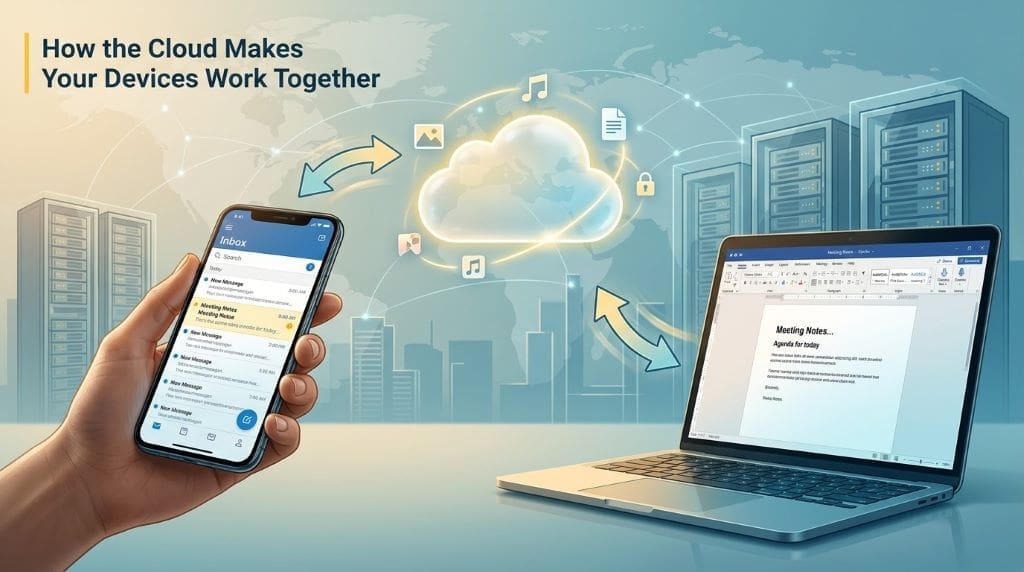
You check emails on your phone. Then, you edit documents on your laptop. Your files appear instantly on both devices. How does this magic happen? Cloud computing makes it possible. Yet most people don’t understand how it actually works. They store photos, stream music, and collaborate online daily. However, the technology behind these actions remains mysterious. This guide breaks down cloud computing into simple terms. You’ll learn exactly how the cloud stores and delivers your data. Moreover, you’ll discover why millions of businesses trust this technology. Let’s explore cloud computing together.
Key Takeaways
- Cloud computing stores and accesses data over the internet instead of local hardware
- Three main service types exist: IaaS, PaaS, and SaaS
- Businesses save money by paying only for resources they use
- Security and scalability are major benefits of cloud technology
- The cloud enables collaboration from anywhere in the world
What Is Cloud Computing?
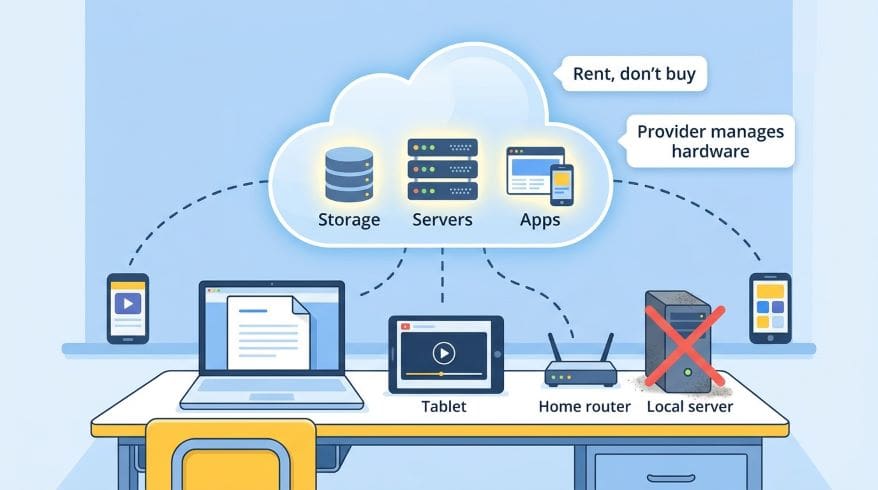
Cloud computing delivers computing services over the internet. Think of it as renting instead of buying. You access storage, servers, and software online. Therefore, you don’t need expensive local hardware. The provider handles all the technical work. You simply use what you need when you need it.
Cloud Computing: How Does It Work?
The cloud operates through remote servers stored in data centers. These data centers exist worldwide. When you save a file, it travels through the internet. Then, it reaches one of these servers. The server stores your data securely. Later, you can access it from any device. Therefore, your information stays available 24/7.
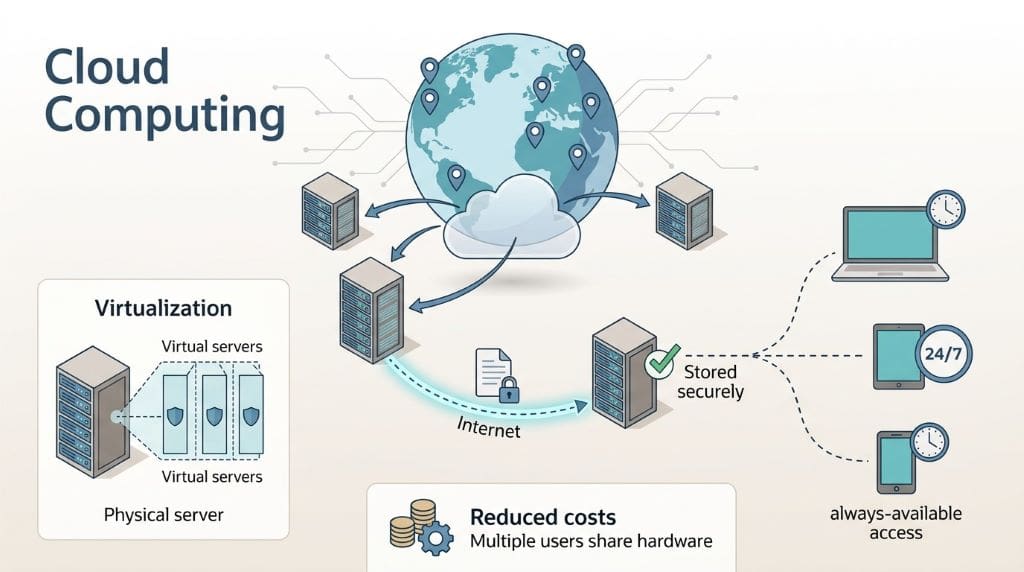
Virtualization makes cloud computing possible. This technology splits physical servers into virtual ones. As a result, multiple users share the same hardware. However, each user’s data stays separate and secure. This efficiency reduces costs significantly.
Also read: Edge Computing Explained in 5 Easy Steps!
Three Main Cloud Service Models
IaaS (Infrastructure as a Service)
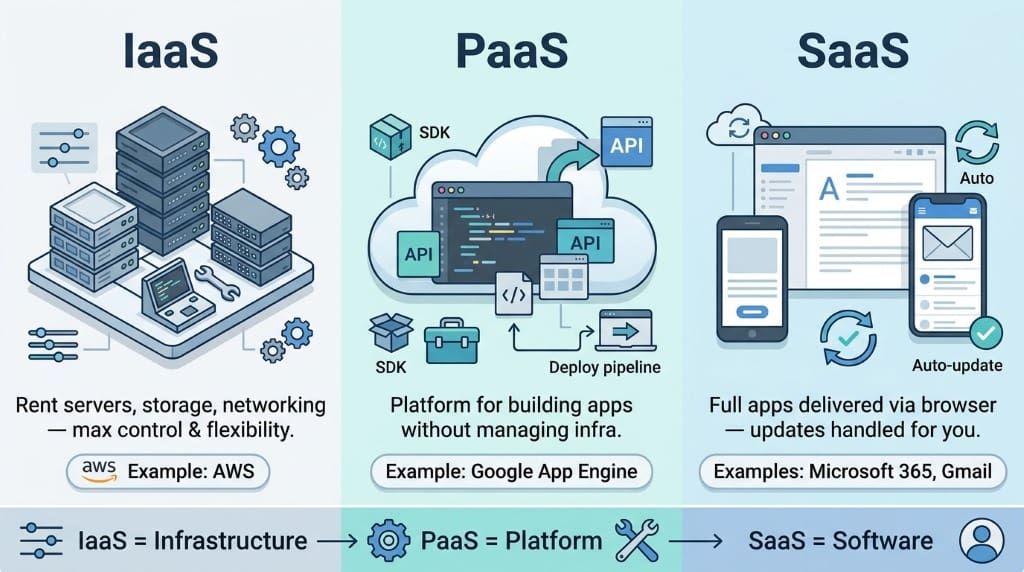
IaaS (Infrastructure as a Service) provides basic computing infrastructure. You rent servers, storage, and networking equipment. Amazon Web Services is a popular IaaS example. This model gives you maximum control and flexibility.
PaaS (Platform as a Service)
PaaS (Platform as a Service) offers development platforms. Developers build applications without managing infrastructure. Google App Engine exemplifies this service. Consequently, teams focus purely on creating software.
SaaS (Software as a Service)
SaaS (Software as a Service) delivers complete applications online. Users access software through web browsers. Microsoft 365 and Gmail are common examples. Additionally, updates happen automatically without user effort.
Also Read: Cloud Engineering Roles Simplified for High School Students
Why Cloud Computing Matters
Scalability stands as the cloud’s biggest advantage. Companies expand or reduce resources instantly. Growth happens without buying new equipment. Similarly, you scale down during quiet periods. This flexibility saves money and improves efficiency.
How Cloud Computing Saves Money
Businesses eliminate expensive server purchases with cloud computing. Subscriptions replace large capital expenditures. You stop paying for unused capacity. Additionally, electricity costs drop without local servers. Maintenance teams become unnecessary, freeing up staff.
Scaling Resources Instantly
Resources adjust automatically based on demand. Traffic spikes don’t cause crashes or slowdowns. The system adds capacity within minutes. Likewise, it reduces resources when traffic drops. This automation ensures optimal performance always.
Working Together From Anywhere
Employees access work files from any location. Remote work becomes seamless and efficient. Multiple people edit documents simultaneously. Version control happens automatically without confusion. Therefore, teams accomplish more in less time.
Keeping Your Data Safe
Providers invest millions in security infrastructure. Encryption protects data during transfer and storage. Security teams monitor systems around the clock. Updates happen regularly to fix vulnerabilities. As a result, data stays safer than on-premise systems.
How Different Businesses Use Cloud Computing
Small Businesses and Startups
Startups launch faster using cloud services. They avoid massive upfront investments in hardware. Growth happens quickly without technical limitations. Small teams compete effectively with larger companies. Tools cost pennies compared to traditional software. Therefore, innovation becomes accessible to everyone.
Large Companies
Corporations handle massive data volumes through cloud infrastructure. Processing power scales to match their needs. Different departments access shared resources efficiently. Integration happens smoothly across global offices. Consequently, operations run faster and more efficiently.
Emerging Cloud Trends
Artificial intelligence integrates seamlessly with cloud platforms. AI tools analyze data faster than ever before. Machine learning models train on cloud infrastructure. IoT devices connect and communicate through cloud networks. Edge computing brings processing closer to users. Therefore, applications become smarter and more responsive.
Sustainability drives modern cloud data center design. Providers use renewable energy sources increasingly. Carbon footprints decrease with efficient cloud operations. Green initiatives benefit both business and environment.
Common Cloud Computing Challenges
Privacy Concerns
Data privacy remains a valid concern for users. Information travels across networks and storage systems. Breaches can expose sensitive business data. Regulations vary across different countries and regions. Therefore, compliance requires constant attention and effort.
Service Interruptions
Outages happen occasionally even with reliable providers. Downtime stops access to critical business applications. Lost productivity costs companies money and reputation. However, most providers maintain excellent uptime records. Redundancy systems minimize disruption when problems occur.
Meeting Legal Requirements
Regulations differ between countries and industries. GDPR sets strict rules for European data. Healthcare requires HIPAA compliance in America. Companies must understand their specific requirements. Choosing certified providers simplifies compliance significantly.
The Future of Cloud Computing
New Technologies Ahead
Quantum computing will revolutionize cloud processing capabilities. Surprisingly, calculations that take years will complete instantly. Also, serverless computing removes infrastructure management completely. Actually, containers make applications portable across any platform. These advances create exciting new possibilities.
Industry Growth Projections
Additionally, users gain access to more extensive and varied options. Market size will likely triple by 2030. More companies adopt cloud-first strategies daily. Investment in cloud infrastructure continues accelerating worldwide. Therefore, opportunities expand for both providers and users.
Impact on Global Markets
Global markets transform dramatically through cloud adoption. Businesses operate internationally without physical infrastructure. Small companies compete on the same level as corporations. Additionally, geographic barriers disappear with cloud technology. As a result, innovation spreads faster across borders.
Developing nations benefit significantly from cloud computing. Access to technology becomes affordable and immediate. Entrepreneurs launch businesses with minimal investment. Education improves through cloud-based learning platforms. Therefore, economic growth accelerates in emerging markets.
Frequently Asked Questions
How secure is cloud computing really?
Cloud providers invest heavily in security measures. Encryption protects your data constantly. Professional security teams monitor systems continuously. Most breaches happen due to user errors. Therefore, cloud storage often beats local security.
Can small businesses afford cloud computing?
Cloud services fit any budget size perfectly. You pay only for what you use. Startup costs remain extremely low. Many providers offer free basic tiers. Consequently, even tiny businesses benefit from cloud technology.
What happens if my internet goes down?
Internet connectivity is essential for cloud access. Without connection, you can’t reach your files. However, some applications offer offline modes. Data syncs automatically when connection returns. Therefore, plan for backup internet options.
How does cloud computing differ from traditional storage?
Traditional storage keeps data on physical devices. Cloud storage uses remote servers instead. You can access cloud data from anywhere. Physical storage limits you to specific locations. Additionally, cloud storage scales without buying hardware.
Will cloud computing replace all local storage?
Hybrid approaches will likely remain most common. Some data needs local storage for speed. However, cloud adoption continues growing rapidly. Critical information moves to the cloud increasingly. Therefore, expect cloud dominance but not complete replacement.
Final Thoughts
Cloud computing revolutionizes how we work and store information. Understanding how it works helps you leverage its benefits. Businesses save money while improving efficiency significantly. Security and scalability make cloud adoption compelling. Therefore, learning cloud technology becomes increasingly important.
The future looks bright for cloud computing. New technologies emerge constantly, expanding possibilities. Adoption rates climb across all industries worldwide. Whether you’re a student or business owner, understanding cloud computing matters. Start exploring cloud services today to stay competitive.
References
- Mell, P., & Grance, T. (2011). The NIST definition of cloud computing. National Institute of Standards and Technology. https://doi.org/10.6028/NIST.SP.800-145
- Islam, R., Patamsetti, V., Gadhi, A., Gondu, R. M., Bandaru, C. M., Kesani, S. C., & Abiona, O. (2023). The Future of cloud Computing: benefits and challenges. International Journal of Communications Network and System Sciences, 16(04), 53–65. https://doi.org/10.4236/ijcns.2023.164004
- Golightly, L., Chang, V., Xu, Q. A., Gao, X., & Liu, B. S. (2022). Adoption of cloud computing as innovation in the organization. International Journal of Engineering Business Management, 14. https://doi.org/10.1177/18479790221093992
- Author
- Latest Posts

Charudatta Pathak was a student at St. Aloysius High School in Bhusawal, established in 1874, making it one of India’s oldest convent institutions. He earned his bachelor’s degree in mechanical engineering from SSVPS College of Engineering, Dhule in 1995, demonstrating exceptional academic achievement. Thereafter, he launched his career as a CNC programmer in a toolroom. He has utilized FANUC, Deckel, Maho, and Mikron controllers to operate 2-axis and 3-axis machines for the fabrication of jigs, fixtures, dies, and molds. He commenced his career as an academic in 1996, when he assumed the role of lecturer at SSVPS College of Engineering, Dhule. Additionally, he earned his post-graduate degree in CAD/CAM from L. D. College of Engineering, Ahmedabad, in 2000, and then acquired a Ph.D. from COEP in 2011 while concurrently engaged in teaching. Until 2023, he occupied many academic roles, including lecturer, assistant professor, professor, dean, principal, director, and vice chancellor at both public and private universities throughout India. From 2008 to 2010, he served as the project lead in the CAE department of a European multinational firm. During his 28-year professional tenure, he identified a need for dependable books targeted at students in grades 8 to 12, particularly for nascent career planning. He founded ENTECH Digital Magazine, a free monthly publication available on entechonline.com and magzter.com. Teens with a strong interest in Science, Technology, Engineering, and Mathematics (STEM) who aspire to pursue careers in these fields may find ENTECH Digital Magazine beneficial.